

Stationery
Email Communication
All faculty and staff members should consider electronic mail an extension of University letterhead. Messages sent from a Clayton State University email account by a faculty or staff member are on behalf of the University. Graphics, quotes, and other personalization should be avoided.
Install Your Official Clayton State Email Signature
👉Start here:
Generate your signature using the official email signature tool.
Signature Usage Rules (Please Read Before Editing)
To protect the university’s brand and ensure consistency across all communications, please do not modify the signature after adding it to Outlook.
Please DO:
- Use the signature exactly as generated
- Use your signature for replies only to help save space
- Keep it clean, consistent, and professional
- Regenerate a new signature if your information changes
- Use a “Book My Time” link or office address instead of listing your email (if applicable)
- Include pronouns if you choose
Do NOT:
- Alter the logo (size, colors, spacing, or placement)
- Change fonts, font sizes, or text colors
- Add extra images, icons, or artwork
- Remove required elements such as the logo
- Insert personal quotes, slogans, or taglines
- Rearrange the layout or spacing
Maintaining a consistent signature strengthens the university’s brand and ensures every message appears polished and professional.
Outlook Instructions
New Outlook for Windows
The best method is drag and drop to preserve formatting.
- Generate your signature
- Highlight the entire signature
- Click and hold the highlighted area
- Drag it directly into the Outlook signature box
- Release the mouse
Note: Copy and paste will not preserve formatting in the new Outlook.
Outlook Classic for Windows
- Generate your signature
- Copy it (Ctrl + C or right-click and Copy)
- Go to File → Options → Mail → Signatures
- Right-click in the signature editor and select “Keep Source Formatting”
- Avoid using Ctrl + V
Outlook for Mac
- Generate your signature
- Copy it
- Go to Preferences → Signatures
- Right-click (or Control-click) and paste
- Avoid using simple Cmd + V if formatting is lost
Letterhead
Clayton State University letterhead is available through Printing Services. Faculty and staff should not order letterhead from any off-campus vendor. To order letterhead, complete a letterhead order form on the Printing website.
All letterhead is customized with a department’s name. All letterhead is printed on 24# Strathmore – soft white paper. The two-color is printed in PMS 165 official orange and PMS 288 official blue. One color is printed in PMS 288 official blue. Note cards are printed on cardstock.
Only official letterhead as described above (either 2-color or 1-color blue) should be used by all departments for communications purposes. Click on the thumbnail to view letterhead at a larger size.
Letterhead Example

Business Cards
Business Cards for Faculty and Staff
Official University business cards should be ordered from Printing Services. Faculty and staff should not order business cards from any off-campus vendor.
To order business cards, submit a Business Card Request Form available on the Printing website along with the information to be printed on the card.
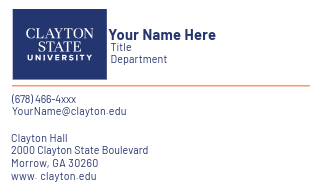
The cards are three-color (orange & blue logo with black text) on 80# Strathmore – soft white - card stock, Helvetica is the official font. Your card order normally takes approximately three weeks to be filled. Call Ext. 4377 for more information.
Business Cards for Students
Student assistants, although they are employees, should not have official business cards. Students who are officers or members of recognized student clubs and organizations who wish to represent Clayton State University may consult with the Office of Marketing and Communications, Laker Life, and Printing Services to submit a design.
Business Cards Example
Name Badges
Faculty and Staff Name Badges
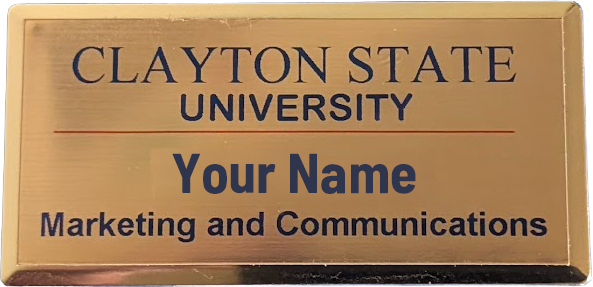
Orders for official Clayton State University faculty and staff name badges are placed with Printing Services. The name tags are a gold finished metal with black lettering and a magnetic back. Placing a title or department on the name badge is optional.
Student Name Badges
Name badges for students and/or student assistants who work in University departments should be distinguished from those for University faculty and staff. Student name badges are silver and will state on the badge that the individual is a student. All student name badges will be ordered through Printing Services.
Name Badge Example
CAUTION: The name tag is a magnetic device. If you have a pacemaker or other medical device, do not use the name tag. Please note you need an alternate pin type when purchasing your name tag.